
Connecting your TikTok account is required to apply to Influencer Partnership briefs on TikTok. Once connected, Cohley pulls in your audience metrics, top-performing posts, and post-level performance so brands can see your reach.
For the full step-by-step on connecting, updating, or switching accounts (across Instagram, TikTok, and YouTube), see How do I connect or update my Instagram, TikTok, or YouTube account on Cohley? This article covers the TikTok-specific parts of the flow.
The #1 issue: Analytics not enabled in the TikTok app
If you’ve authorized Cohley but the connection isn’t pulling in your metrics, it’s almost always because Analytics aren’t enabled in your TikTok app. TikTok requires Analytics to be enabled before any third-party integration (like Cohley) can read your data.
To turn Analytics on:
- Open the TikTok app on your phone
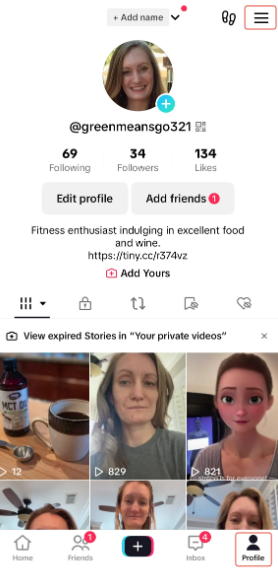
- Go to your Profile and tap the menu icon
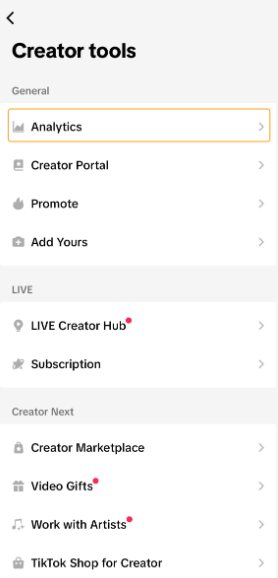
- Go to Creator tools (or Settings and privacy → Creator tools, depending on your TikTok version)
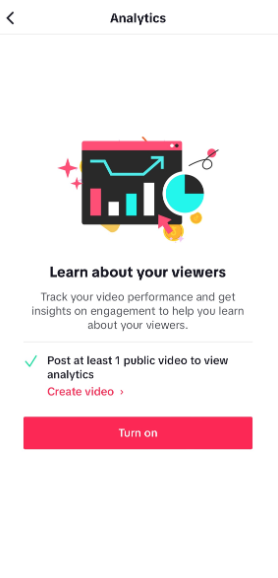
- Open Analytics and make sure it’s enabled
- Come back to Cohley and re-authorize TikTok from My Profile → My Accounts
If you can’t find Analytics in your version of the app, see TikTok’s help page on enabling Analytics.
What permissions Cohley requests
When you authorize, TikTok will show you the permissions Cohley needs. They’re all read-only with one narrow exception:
- Read your Creator analytics — so brands can see your follower count, engagement rate, and audience demographics
- Read your Creator information — your profile basics (display name, username, profile photo)
- Update the status of your TikTok Creator Marketplace orders — only used if Cohley is managing a Marketplace order on a brief; doesn’t affect any other part of your TikTok account
If you’re still having trouble
After enabling Analytics and re-authorizing, if metrics still aren’t flowing in:
- Make sure you’re signed in to the right TikTok account in your browser before authorizing
- Clear your browser cache and cookies, then try again
- Try a different browser
- Re-authorize from My Profile → My Accounts — click the pencil edit icon next to TikTok
If it’s still not working, email support@cohley.com with your TikTok handle and a screenshot of any error you’re seeing.